Creating type-safe, composable tools for your agents
In Part 5, we explored middleware for cross-cutting concerns. Now let’s look at how agents interact with the outside world through tools.
What is a Tool?
A Tool is the mechanism that allows agents to interact beyond text generation. While LLMs can only generate text, tools give agents the ability to:
- Retrieve information: Search databases, query APIs, read files
- Take actions: Send emails, create records, execute code
- Access real-time data: Check weather, stock prices, current time
Without tools, an agent is limited to its training data. With tools, an agent becomes a capable system that can accomplish real-world tasks.
How Tools Fit in the Architecture
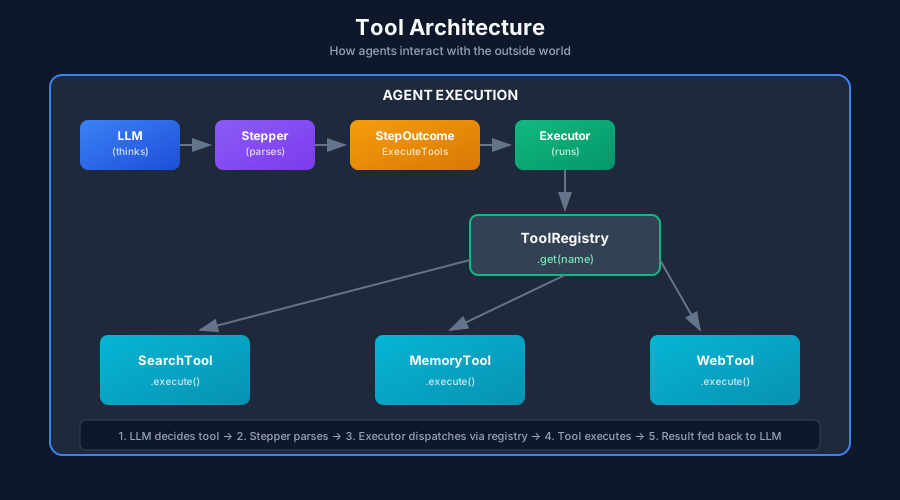
The flow:
- LLM decides which tool to use based on
nameanddescription - Stepper parses the response and returns
StepOutcome::ExecuteTools - Executor looks up the tool in
ToolRegistryby name - Executor calls
tool.execute(input)with the LLM-provided arguments - Tool result is recorded and fed back to the LLM in the next iteration
Design Decisions
| Design Choice | Rationale |
|---|---|
| Trait-based | Any struct can be a tool—easy to extend |
| JSON Schema input | LLMs understand JSON; enables validation |
| Async execution | Tools often do I/O (network, disk) |
| Separate output vs data | output for LLM, data for persistence/analytics |
| Registry pattern | Decouple tool creation from execution |
The Tool Trait
#[async_trait]
pub trait Tool: Send + Sync {
    /// Get the tool's unique name
    fn name(&self) -> &str;

    /// Get the tool's description (used by LLM for tool selection)
    fn description(&self) -> &str;

    /// Get the tool's input schema (JSON Schema format)
    fn input_schema(&self) -> JsonValue;

    /// Execute the tool with given input
    async fn execute(&self, input: ToolInput) -> Result<ToolResult, ToolError>;

    /// Get examples of tool usage (optional)
    fn examples(&self) -> Vec<ToolExample> { vec![] }
}
ToolInput: Type-Safe Parameter Extraction
ToolInput wraps the arguments the LLM provides when calling a tool:
pub struct ToolInput {
    pub tool: String,           // Tool name (for logging/routing)
    pub parameters: JsonValue,  // Arguments from LLM
}

impl ToolInput {
    /// Extract a required parameter
    pub fn get<T: Deserialize>(&self, key: &str) -> Result<T, ToolError> { ... }

    /// Extract an optional parameter
    pub fn get_optional<T: Deserialize>(&self, key: &str) -> Option<T> { ... }

    /// Parse entire parameters into a typed struct (recommended)
    pub fn parse<T: DeserializeOwned>(&self) -> Result<T, ToolError> { ... }
}
The recommended pattern—define a typed input struct:
#[derive(Deserialize, JsonSchema)]
struct SearchInput {
    query: String,
    limit: Option<u32>,
}

async fn execute(&self, input: ToolInput) -> Result<ToolResult, ToolError> {
    let params: SearchInput = input.parse()?;  // Type-safe extraction
    // Use params.query, params.limit...
}
ToolResult: Dual Output
ToolResult has two output fields serving different purposes:
| Field | Purpose | Consumer |
|---|---|---|
output | Human-readable text | LLM (for reasoning) |
data | Structured JSON | System (for persistence, analytics) |
pub struct ToolResult {
    pub tool: String,              // Which tool executed
    pub output: String,            // Text for LLM consumption
    pub data: Option<JsonValue>,   // Structured data for system use
    pub success: bool,             // Did it work?
    pub error: Option<String>,     // Error message if failed
}
Why two outputs? The LLM doesn’t need raw JSON—a summary is more token-efficient. But the system may want structured data for logging or further processing.
// Example: Search tool returns both
ToolResult::success("search", "Found 3 documents about Rust async")
    .with_data(json!({
        "count": 3,
        "documents": [...]  // Full data for system
    }))
ToolRegistry: Managing Available Tools
ToolRegistry holds all available tools for an agent:
pub struct ToolRegistry {
    tools: HashMap<String, Arc<dyn Tool>>,
}

impl ToolRegistry {
    pub fn new() -> Self { ... }

    /// Register a tool (builder pattern)
    pub fn register(&mut self, tool: Arc<dyn Tool>) -> &mut Self { ... }

    /// Look up tool by name
    pub fn get(&self, name: &str) -> Option<Arc<dyn Tool>> { ... }

    /// Execute a tool by name
    pub async fn execute(&self, input: ToolInput) -> Result<ToolResult, ToolError> { ... }

    /// Generate tool descriptions for LLM prompt/API
    pub fn tool_descriptions(&self) -> Vec<ToolDescription> { ... }
}
Usage:
let mut registry = ToolRegistry::new();
registry
    .register(Arc::new(SearchTool::new()))
    .register(Arc::new(MemoryTool::new()))
    .register(Arc::new(WebSearchTool::new()));

// Pass to executor
let executor = AgentExecutor::new(profile, Arc::new(registry), llm);
Complete Tool Implementation Example
use schemars::JsonSchema;
#[derive(Deserialize, JsonSchema)]
struct SearchInput {
/// Search query string
query: String,
/// Maximum number of results
#[serde(default = "default_limit")]
limit: u32,
}
fn default_limit() -> u32 { 10 }
pub struct SearchTool {
knowledge_base: Arc<KnowledgeBase>,
}
#[async_trait]
impl Tool for SearchTool {
fn name(&self) -> &str {
"search_knowledge"
}
fn description(&self) -> &str {
"Search the knowledge base for relevant information"
}
fn input_schema(&self) -> serde_json::Value {
schemars::schema_for!(SearchInput)
}
async fn execute(&self, input: ToolInput) -> Result<ToolResult, ToolError> {
// Type-safe input parsing
let params: SearchInput = input.parse()?;
// Execute search logic
let results = self.knowledge_base
.search(¶ms.query, params.limit)
.await
.map_err(|e| ToolError::ExecutionFailed(e.to_string()))?;
// Return both LLM-friendly output and structured data
Ok(ToolResult::success(
self.name(),
format!("Found {} results for '{}'", results.len(), params.query)
).with_data(serde_json::to_value(&results)?))
}
}
// Register
let mut registry = ToolRegistry::new();
registry.register(Arc::new(SearchTool::new(knowledge_base)));Best Practices for Tool Design
1. Clear, Focused Names and Descriptions
// Good: Clear, focused tools with typed input
fn name(&self) -> &str { "search_knowledge" }
fn description(&self) -> &str {
    "Search the knowledge base for relevant information"
}

// Bad: Vague, overly broad tools
fn name(&self) -> &str { "do_stuff" }
2. Handle Failures Gracefully
Tools should return errors via ToolResult, not panic:
async fn execute(&self, input: ToolInput) -> Result<ToolResult, ToolError> {
let params: MyInput = input.parse()?;
match self.internal_call(¶ms).await {
Ok(result) => Ok(ToolResult::success(self.name(), result)
.with_data(serde_json::to_value(result)?)),
Err(e) => Ok(ToolResult::failure(self.name(), format!("Failed: {}", e))),
}
}3. Use JSON Schema for Validation
Deriving JsonSchema from schemars generates schemas automatically:
#[derive(Deserialize, JsonSchema)]
struct SearchInput {
    /// Search query string (this becomes the schema description)
    query: String,
    /// Maximum results to return
    #[serde(default = "default_limit")]
    limit: u32,
}
Next up: Part 7 - Putting It All Together: Complete Implementation →
This series is based on the Reflexify agentic architecture, designed for production multi-tenant SaaS applications.