Adding cross-cutting concerns without polluting core logic
In Part 4, we explored how steppers implement different reasoning strategies. Now let’s look at how to add logging, metrics, rate limiting, and other concerns without modifying core agent code.
The Problem with Cross-Cutting Concerns
Without middleware, adding observability features means modifying the executor directly:
// Without Middleware - everything mixed together
Executor {
    log("starting step...");           // Logging
    let start = Instant::now();        // Metrics
    check_rate_limit();                // Rate limiting
    let result = stepper.step();       // Actual work
    record_latency(start.elapsed());   // More metrics
    log("step complete");              // More logging
}
This approach has serious problems:
- Core logic becomes cluttered
- Adding new concerns requires modifying the executor
- Concerns can’t be composed or reordered
- Testing becomes difficult
Middleware: Composable Interceptors
Middleware provides hooks that wrap operations with before/after logic:
// With Middleware - clean separation
Executor {
    middleware.before_step();          // Delegate to middleware
    let result = stepper.step();       // Pure core logic
    middleware.after_step(result);     // Delegate to middleware
}

// Concerns are separate, composable modules:
LoggingMiddleware { ... }
MetricsMiddleware { ... }
RateLimitMiddleware { ... }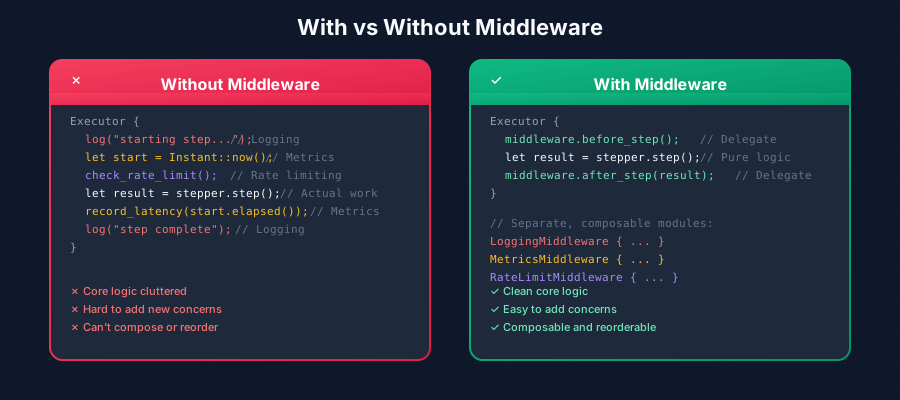
Think of middleware as interceptors that can:
- Observe: Log, measure, audit what’s happening
- Modify: Transform messages, responses, or outcomes
- Control: Rate limit, retry, or abort operations
Where Hooks Are Called
Middleware hooks are called at specific points during agent execution:
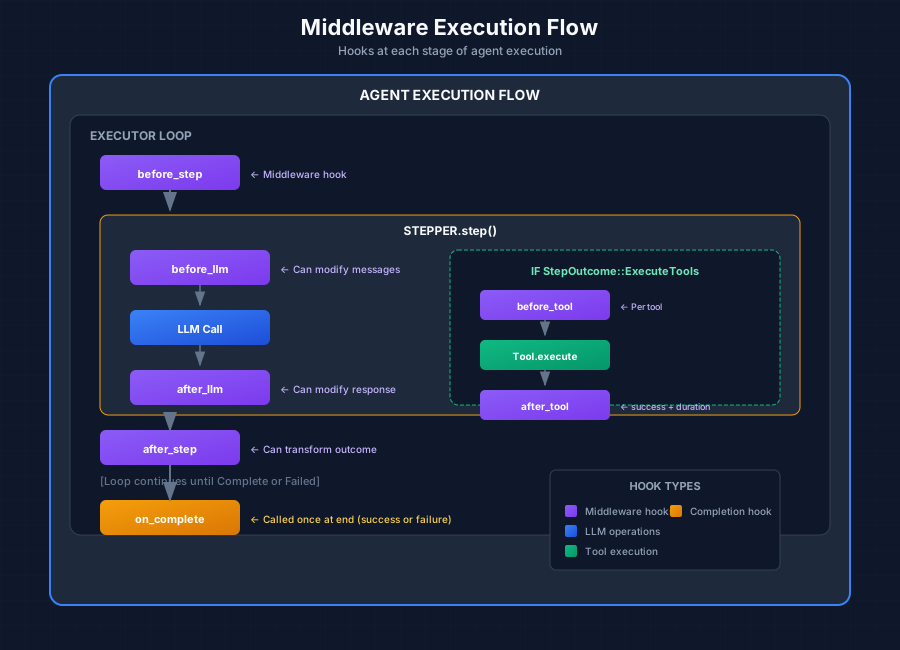
The hooks and their positions:
- before_step - Before each reasoning step begins
- before_llm - Before calling the LLM (can modify messages)
- after_llm - After LLM response (can modify response)
- after_step - After step completes (can transform outcome)
- before_tool - Before each tool execution
- after_tool - After tool execution (includes success/duration)
- on_complete - Once at the end (success or failure)
The Onion Model
Multiple middleware execute in onion order—first registered runs first on “before” hooks, last on “after” hooks:
Request flow (before_*):    M1 → M2 → M3 → [Operation]
Response flow (after_*):    [Operation] → M3 → M2 → M1
Visualized:
┌─────────────────────────────────────────────────────┐
│  M1.before_llm()                                    │
│    ┌─────────────────────────────────────────────┐  │
│    │  M2.before_llm()                            │  │
│    │    ┌─────────────────────────────────────┐  │  │
│    │    │  M3.before_llm()                    │  │  │
│    │    │    ┌─────────────────────────────┐  │  │  │
│    │    │    │       LLM.chat()            │  │  │  │
│    │    │    └─────────────────────────────┘  │  │  │
│    │    │  M3.after_llm()                     │  │  │
│    │    └─────────────────────────────────────┘  │  │
│    │  M2.after_llm()                             │  │
│    └─────────────────────────────────────────────┘  │
│  M1.after_llm()                                     │
└─────────────────────────────────────────────────────┘
This allows outer middleware to measure total time including inner middleware.
The Middleware Trait
All methods have default no-op implementations, so you only implement hooks you need:
#[async_trait]
pub trait Middleware: Send + Sync {
    /// Unique identifier for this middleware
    fn id(&self) -> MiddlewareId;

    /// Before each reasoning step
    async fn before_step(
        &self,
        profile: &AgentProfile,
        ctx: &mut dyn AgentContext
    ) -> Result<()> {
        Ok(())
    }

    /// After each step - can TRANSFORM the outcome
    async fn after_step(
        &self,
        profile: &AgentProfile,
        ctx: &mut dyn AgentContext,
        outcome: StepOutcome
    ) -> Result<StepOutcome> {
        Ok(outcome)
    }

    /// Before LLM call - can MODIFY messages
    async fn before_llm(
        &self,
        ctx: &mut dyn AgentContext,
        messages: &mut Vec<Message>,
        tools: &[ToolDefinition]
    ) -> Result<()> {
        Ok(())
    }

    /// After LLM call - can inspect/modify response
    async fn after_llm(
        &self,
        ctx: &mut dyn AgentContext,
        response: &mut ChatResponse
    ) -> Result<()> {
        Ok(())
    }

    /// Before tool execution
    async fn before_tool(
        &self,
        ctx: &mut dyn AgentContext,
        tool_name: &str
    ) -> Result<()> {
        Ok(())
    }

    /// After tool execution - includes success flag and duration
    async fn after_tool(
        &self,
        ctx: &mut dyn AgentContext,
        tool_name: &str,
        success: bool,
        duration_ms: u64
    ) -> Result<()> {
        Ok(())
    }

    /// When execution completes (success or failure)
    async fn on_complete(
        &self,
        ctx: &dyn AgentContext,
        result: &AgentExecutionResult
    ) -> Result<()> {
        Ok(())
    }
}
Common Use Cases
| Use Case | Hook | What It Does |
|---|---|---|
| Logging | on_complete | Print execution summary with all steps |
| Metrics | after_llm, after_tool | Record latency, token usage, success rates |
| Rate Limiting | before_llm | Sleep or reject if too many requests |
| Context Window | before_llm | Truncate/summarize if messages too long |
| RAG Injection | before_llm | Retrieve and inject relevant context |
| Retry Logic | after_step | Transform Failed → Continue with backoff |
| Guardrails | after_llm | Check response for policy violations |
| Caching | before_llm | Return cached response, skip LLM call |
Example: LoggingMiddleware
A simple middleware that prints execution summaries:
pub struct LoggingMiddleware {
    id: MiddlewareId,
}

#[async_trait]
impl Middleware for LoggingMiddleware {
    fn id(&self) -> MiddlewareId {
        self.id.clone()
    }

    async fn on_complete(
        &self,
        _ctx: &dyn AgentContext,
        result: &AgentExecutionResult,
    ) -> Result<()> {
        println!("============================================================");
        println!("AGENT EXECUTION SUMMARY");
        println!("============================================================");
        println!("Status: {}", if result.completed { "Completed" } else { "Failed" });
        println!("Iterations: {}", result.iterations);
        println!("Steps: {}", result.steps.len());

        for (i, step) in result.steps.iter().enumerate() {
            println!("\n[{}] {:?}", i + 1, step.step_type);
            println!("  {}", step.content);
        }

        println!("\nFINAL ANSWER:\n{}", result.answer);
        Ok(())
    }
}
Example: MetricsMiddleware
A middleware that records performance metrics:
struct MetricsMiddleware {
    id: MiddlewareId,
    // metrics collector, etc.
}

#[async_trait]
impl Middleware for MetricsMiddleware {
    fn id(&self) -> MiddlewareId {
        self.id.clone()
    }

    async fn before_llm(
        &self,
        _ctx: &mut dyn AgentContext,
        messages: &mut Vec<Message>,
        _tools: &[ToolDefinition],
    ) -> Result<()> {
        let token_estimate = estimate_tokens(messages);
        self.record_input_tokens(token_estimate);
        Ok(())
    }

    async fn after_llm(
        &self,
        _ctx: &mut dyn AgentContext,
        response: &mut ChatResponse,
    ) -> Result<()> {
        if let Some(usage) = &response.usage {
            self.record_output_tokens(usage.completion_tokens);
        }
        Ok(())
    }

    async fn after_tool(
        &self,
        _ctx: &mut dyn AgentContext,
        tool_name: &str,
        success: bool,
        duration_ms: u64,
    ) -> Result<()> {
        self.record_tool_execution(tool_name, success, duration_ms);
        Ok(())
    }
}
Adding Middleware to Executors
let mut executor = AgentExecutor::new(profile, tools, llm);
executor.add_middleware(Arc::new(LoggingMiddleware::new()));
executor.add_middleware(Arc::new(MetricsMiddleware::new()));
executor.add_middleware(Arc::new(RateLimitMiddleware::new()));
The order of registration matters—earlier middleware wrap later ones in the onion model.
Next up: Part 6 - Building Tools: Type-Safe Agent Capabilities →
This series is based on the Reflexify agentic architecture, designed for production multi-tenant SaaS applications.