Implementing different reasoning strategies: ReAct and Function Calling
In Part 3, we explored the dual-context pattern. Now let’s look at the core of agent reasoning: the Stepper.
What is a Stepper?
A Stepper defines HOW an agent executes a single reasoning step. The executor owns the loop and calls step() repeatedly; the stepper handles what happens within each iteration.
This separation is powerful because it lets you swap reasoning strategies without changing the execution infrastructure.
#[async_trait]
pub trait Stepper: Send + Sync {
    /// Execute a single step of the agent loop.
    ///
    /// The stepper:
    /// - Builds messages (from context.messages() + profile.system_prompt)
    /// - Calls the LLM (via exec_ctx) with tools from profile
    /// - Parses the response
    /// - Returns the outcome
    ///
    /// It does NOT:
    /// - Execute tools (executor handles that)
    /// - Manage the loop (executor handles that)
    async fn step(
        &self,
        profile: &AgentProfile,
        context: &mut dyn AgentContext,
        exec_ctx: &mut dyn ExecutionContext,
    ) -> Result<StepOutcome>;

    /// Returns the stepper type
    fn stepper_type(&self) -> StepperType;
}
StepOutcome: What a Step Can Return
Each step returns a StepOutcome that tells the executor what to do next:
pub enum StepOutcome {
    /// Continue to next iteration (internal state updated)
    Continue,

    /// Execute the specified tools, then continue
    ExecuteTools(Vec<ToolExecution>),

    /// Execution complete with result
    Complete(serde_json::Value),

    /// Execution failed with error message
    Failed(String),
}

pub struct ToolExecution {
    /// Unique ID for this tool call (from LLM)
    pub id: String,
    /// Name of the tool to execute
    pub name: String,
    /// Arguments for the tool (JSON)
    pub arguments: serde_json::Value,
}
The key insight: steppers don’t execute tools. They parse the LLM’s intent and return ExecuteTools, letting the executor handle the actual dispatch.
Two Stepper Types
| Stepper | Mechanism | Best For |
|---|---|---|
FunctionCallingStepper | Native LLM tool calling API | OpenAI, Anthropic, Gemini with structured output |
ReactStepper | Text parsing (THOUGHT/ACTION/OBSERVATION) | Any LLM, explicit reasoning traces |
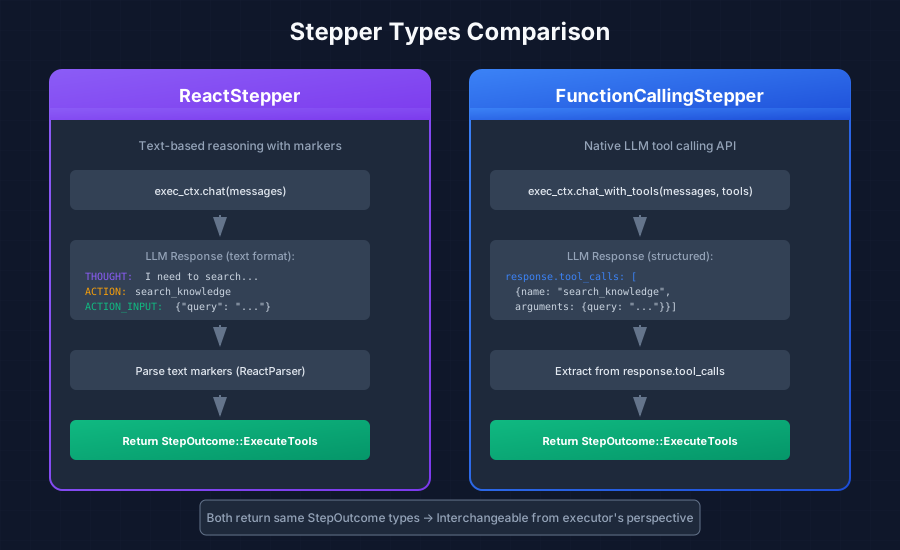
ReactStepper: Text-Based Reasoning
The ReactStepper implements the ReAct (Reasoning + Acting) pattern using text markers. It works with any LLM because it doesn’t require native function calling support.
Implementation
pub struct ReactStepper {
parser: ReactParser,
}
impl ReactStepper {
pub fn new() -> Self {
Self {
parser: ReactParser::new(),
}
}
}
#[async_trait]
impl Stepper for ReactStepper {
async fn step(
&self,
profile: &AgentProfile,
agent_ctx: &mut dyn AgentContext,
exec_ctx: &mut dyn ExecutionContext,
) -> Result<StepOutcome> {
// 1. Build messages from profile + context + execution steps
let messages = Self::build_messages(profile, agent_ctx, exec_ctx);
// 2. Build generation params from profile
let params = profile.generation_params();
// 3. Call LLM via ExecutionContext (applies middleware hooks)
let response = exec_ctx.chat(agent_ctx, &messages, Some(¶ms)).await?;
// 4. Parse the response
let parsed = self.parser.parse(&response.content).await?;
// 5. Record thought in execution context (internal reasoning)
if !parsed.thought.is_empty() {
exec_ctx.add_step(AgentStep::thought(parsed.thought.clone()));
}
// 6. Return appropriate StepOutcome
if let Some(answer) = parsed.answer {
exec_ctx.add_step(AgentStep::answer(answer.clone()));
return Ok(StepOutcome::complete_text(answer));
}
if let Some(action_name) = parsed.action {
let input_json = parsed.action_input
.map(|s| serde_json::from_str(&s).unwrap_or(json!({})))
.unwrap_or(json!({}));
exec_ctx.add_step(AgentStep::action(action_name.clone(), input_json.clone()));
return Ok(StepOutcome::ExecuteTools(vec![
ToolExecution::new(
uuid::Uuid::new_v4().to_string(),
action_name,
input_json
)
]));
}
Ok(StepOutcome::failed("Agent provided neither action nor answer"))
}
fn stepper_type(&self) -> StepperType {
StepperType::React
}
}Building Messages
The ReAct stepper combines messages from multiple sources:
impl ReactStepper {
    fn build_messages(
        profile: &AgentProfile,
        context: &dyn AgentContext,
        exec_ctx: &dyn ExecutionContext,
    ) -> Vec<Message> {
        let mut messages = Vec::new();

        // 1. Add ReAct system prompt (format instructions + tools)
        let react_prompt = ReactSystemPrompt {
            context_prompt: Some(profile.system_prompt.clone()),
            tools: profile.tools.iter().map(/* convert */).collect(),
        };
        messages.push(Message::system(react_prompt.render()?));

        // 2. Add user-facing messages from context
        messages.extend(context.messages().iter().cloned());

        // 3. Add reasoning steps from execution context
        for step in exec_ctx.steps() {
            let (role, content) = Self::step_to_message(step);
            messages.push(Message { role, content, tool_calls: None, tool_call_id: None });
        }

        messages
    }

    fn step_to_message(step: &AgentStep) -> (Role, String) {
        match step.step_type {
            StepType::Thought => (Role::Assistant, format!("THOUGHT: {}", step.content)),
            StepType::Action => {
                let input = step.tool_input.clone().unwrap_or(json!({}));
                let tool = step.tool.as_deref().unwrap_or("unknown");
                (Role::Assistant, format!("ACTION: {}\nACTION_INPUT: {}", tool, input))
            }
            StepType::Observation => (Role::User, format!("OBSERVATION: {}", step.content)),
            StepType::Answer => (Role::Assistant, step.content.clone()),
        }
    }
}
Execution Flow
LLM Response:
"THOUGHT: I need to search for revenue data
ACTION: search_knowledge
ACTION_INPUT: {"query": "Q4 revenue"}"
     │
     ▼
Parser extracts action
     │
     ▼
Executor executes tool
     │
     ▼
Next LLM call sees formatted text history
FunctionCallingStepper: Native Tool Calling
The FunctionCallingStepper uses the LLM’s native function calling API instead of text parsing. It’s cleaner when supported, but requires provider-specific integration.
Key Differences
| Aspect | ReactStepper | FunctionCallingStepper |
|---|---|---|
| LLM Call | exec_ctx.chat() | exec_ctx.chat_with_tools() |
| Response Parsing | Text markers | response.tool_calls |
| Tool Input Storage | JSON string | Structured JSON |
| Message Reconstruction | Text format | Tool messages with tool_call_id |
When to Use Each
| Use Case | Recommended Stepper |
|---|---|
| Tool calling with OpenAI/Anthropic/Gemini | FunctionCalling |
| Explicit reasoning traces | React |
| Structured extraction (no tools) | FunctionCalling + response_format |
| Models without function calling | React |
Choosing a Stepper
The choice often depends on your LLM provider and debugging needs:
- FunctionCalling provides cleaner integration with modern LLMs but less visibility into reasoning
- React works universally and shows explicit reasoning, but requires text parsing
Both steppers produce the same StepOutcome types, so they’re interchangeable from the executor’s perspective.
Next up: Part 5 - Middleware Pipeline: Cross-Cutting Concerns →
This series is based on the Reflexify agentic architecture, designed for production multi-tenant SaaS applications.