Understanding the dual-context pattern: AgentContext vs ExecutionContext
In Part 2, we explored the Profile + Stepper + Executor architecture. Now let’s dive into one of its most important design decisions: the separation between user-facing context and internal execution state.
The Two-Context Problem
When building agentic systems, you quickly encounter a tension:
- Users want clean conversations—they ask a question, they get an answer
- Debugging requires full visibility—every reasoning step, every tool call
- Different steppers rebuild message histories differently (ReAct uses text markers, FunctionCalling uses structured tool calls)
Mixing these concerns creates messy code and confusing user experiences. The solution is two distinct context types.
AgentContext: The User-Facing View
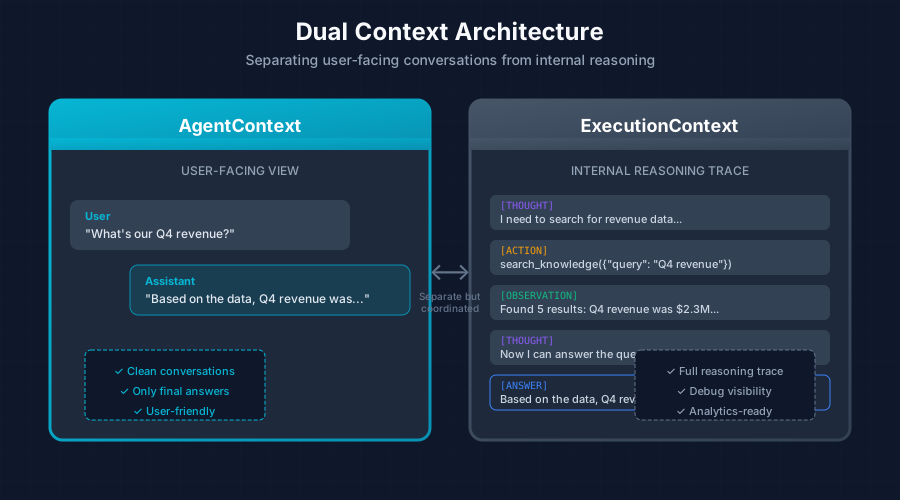
AgentContext manages the conversation as the user sees it. It’s clean, focused, and doesn’t expose internal reasoning:
┌────────────────────────────────────┐
│ User: "What's our Q4 revenue?"     │
│ Assistant: "Based on the data..."  │
└────────────────────────────────────┘
    ↑ Only shows final answers
The trait definition:
pub trait AgentContext: Send + Sync {
    // =========================================================================
    // Message Management
    // =========================================================================

    /// Add a message to the context
    fn add_message(&mut self, message: Message);

    /// Get current messages (read-only)
    fn messages(&self) -> &[Message];

    /// Get message count
    fn message_count(&self) -> usize;

    // =========================================================================
    // Event Streaming
    // =========================================================================

    /// Set the event sender for streaming events to the user
    fn set_event_sender(&mut self, sender: mpsc::Sender<AgentEvent>);

    /// Emit an event to the user (if event sender is set)
    fn emit_event(&self, event: AgentEvent);
}
ExecutionContext: The Internal View
ExecutionContext provides the full reasoning trace—every thought, action, and observation. It’s what you need for debugging, analytics, and step reconstruction:
┌────────────────────────────────────┐
│ [THOUGHT] I need to search...      │
│ [ACTION] search_knowledge(...)     │
│ [OBSERVATION] Found 5 results...   │
│ [THOUGHT] Now I can answer...      │
│ [ANSWER] Based on the data...      │
└────────────────────────────────────┘
    ↑ Full reasoning trace
The trait definition:
#[async_trait]
pub trait ExecutionContext: Send + Sync {
    // =========================================================================
    // LLM Methods (delegated with middleware hooks)
    // =========================================================================

    /// Chat with the LLM (middleware hooks applied)
    async fn chat(
        &self,
        context: &mut dyn AgentContext,
        messages: &[Message],
        params: Option<&GenerationParams>,
    ) -> Result<ChatResponse>;

    /// Chat with tools (middleware hooks applied)
    async fn chat_with_tools(
        &self,
        context: &mut dyn AgentContext,
        messages: &[Message],
        tools: &[ToolDefinition],
        params: Option<&GenerationParams>,
    ) -> Result<ChatResponse>;

    /// Streaming chat (middleware hooks applied)
    async fn chat_stream(
        &self,
        context: &mut dyn AgentContext,
        messages: &[Message],
        params: Option<&GenerationParams>,
    ) -> Result<ChatStream>;

    // =========================================================================
    // LLM Info
    // =========================================================================

    fn provider(&self) -> &str;
    fn model(&self) -> &str;

    // =========================================================================
    // Execution Tracking
    // =========================================================================

    /// Get the current iteration number (0-indexed)
    fn iteration(&self) -> usize;

    /// Increment the iteration counter
    fn increment_iteration(&mut self);

    /// Get all steps taken during execution
    fn steps(&self) -> &[AgentStep];

    /// Add a step to the execution history
    fn add_step(&mut self, step: AgentStep);
}
AgentStep: Recording Execution
Each step in the reasoning process is captured as an AgentStep:
pub struct AgentStep {
    /// Step type (thought, action, observation, etc.)
    pub step_type: StepType,

    /// Content of the step
    pub content: String,

    /// Tool used (if applicable)
    pub tool: Option<String>,

    /// Tool call ID from LLM (for function calling)
    pub tool_call_id: Option<String>,

    /// Tool input (if applicable)
    pub tool_input: Option<serde_json::Value>,

    /// Tool output (if applicable)
    pub tool_output: Option<serde_json::Value>,

    /// Timestamp
    pub timestamp: chrono::DateTime<chrono::Utc>,
}

pub enum StepType {
    /// Agent reasoning/thinking
    Thought,
    /// Agent taking action (using a tool)
    Action,
    /// Observation of action result
    Observation,
    /// Final answer
    Answer,
}
Context Implementations
The architecture supports different persistence strategies through multiple implementations:
| Implementation | Use Case | Persistence |
|---|---|---|
StatelessAgentContext | Single-turn Q&A, extraction | In-memory only |
ChatAgentContext | Multi-turn conversations | Database + compaction |
StatelessAgentContext
For simple, single-turn interactions where you don’t need to persist history:
let mut context = StatelessAgentContext::new()
    .with_query("What is X?");

let result = executor.execute(&mut context, None).await?;
ChatAgentContext
For persistent, multi-turn conversations with features like compaction:
let context = ChatAgentContext::new(
    &chat,
    system_prompt,
    &tools,
    &llm,
    repository,
    compaction_strategy,
).await?;
Benefits of Dual Context
This separation provides several advantages:
- Clean user experience: Users see polished conversations without internal noise
- Full debugging visibility: Developers can trace every reasoning step
- Flexible step reconstruction: Different steppers can rebuild message histories in their own format
- Analytics-ready: Steps can be persisted for analysis and optimization
- Testability: Each context type can be tested independently
How Steppers Use Both Contexts
When a stepper executes a step, it uses both contexts:
async fn step(
&self,
profile: &AgentProfile,
context: &mut dyn AgentContext, // User-facing
exec_ctx: &mut dyn ExecutionContext, // Internal
) -> Result<StepOutcome> {
// Build messages from profile + user context + execution steps
let messages = Self::build_messages(profile, context, exec_ctx);
// Call LLM via execution context (applies middleware)
let response = exec_ctx.chat(context, &messages, Some(¶ms)).await?;
// Record internal step
exec_ctx.add_step(AgentStep::thought(parsed.thought.clone()));
// Return outcome for executor to handle
// ...
}The stepper reads from the user-facing context (what the user asked), records internal reasoning in the execution context, and returns an outcome for the executor to handle.
Next up: Part 4 - The Stepper Pattern: ReAct vs Function Calling
This series is based on the Reflexify agentic architecture, designed for production multi-tenant SaaS applications.